Technical SEO Audit Masterclass — a step-by-step guide for beginners

Introduction — What is a Technical SEO Audit and Why Does it Matter?
You have built a website. You have written good content. You have even added some keywords. But Google still isn't showing your site in search results. Sound familiar?
The problem is usually not your content. It is something deeper — something Google cannot see, cannot read, or cannot understand about your website. That is where a Technical SEO Audit comes in.
Think of your website like a shop. Your content is the products inside. But if the doors are locked, the lights are off, and there is no signboard outside — nobody will walk in. Technical SEO is like fixing the building so customers (and Google) can actually find and enter your shop.
How Technical SEO Differs from On-Page and Off-Page SEO
Most students get confused between on-page, off-page, and technical SEO. Here is the simplest way to understand all three:
| Type | What it covers | Example tasks |
|---|---|---|
| On-Page SEO | Content, keywords, meta tags, headings | Write better title tags, add keywords |
| Off-Page SEO | Backlinks, social signals, brand mentions | Guest posting, link building |
| Technical SEO | Crawling, indexing, speed, structure | Fix robots.txt, improve page speed |
Technical SEO is the foundation. Without it, even the best content will struggle to rank. Here is what technical SEO actually controls on your website:
- Can Google's bots enter and crawl your website?
- Can Google read and understand your page content?
- Is your site fast enough for Google's standards?
- Is your site structure clean and logical?
- Are there any broken pages, redirect errors, or duplicate content issues?
On-page and off-page SEO build on top of technical SEO. If your technical SEO is broken, the other two cannot save you.
When Should You Run a Technical SEO Audit?
You do not need a reason to run a technical audit — but here are the most common situations when it becomes urgent:
Your rankings suddenly dropped
If your website was ranking well and then suddenly fell — a technical issue is very likely the cause. Google may have penalised your site, or a recent update may have flagged a crawling or indexing problem.
You just launched or redesigned your website
New websites often have technical mistakes made during development. Redesigns can accidentally break URLs, remove sitemaps, or block Google from crawling certain pages.
You are migrating to a new domain or platform
Moving from one domain to another (for example, from HTTP to HTTPS, or from WordPress to a custom CMS) is a high-risk moment for SEO. Without a proper audit, you can lose all your existing rankings overnight.
You are publishing content but getting no traffic
If you are writing blogs regularly but Google is not indexing them — or they are indexed but getting zero clicks — technical SEO is almost always the reason.
As a routine health check
Even if your site is performing well, run a technical audit every 3 to 6 months. Websites change constantly — new pages are added, plugins are updated, redirects are added — and small technical problems can quietly pile up.
Tools Needed Before You Begin
Before you start your technical SEO audit, you need the right tools. The good news is that most of the best tools are either free or have a free version. Here is a complete starter toolkit:
| Tool | What it does | Free / Paid | Best for |
|---|---|---|---|
| Google Search Console | Check index & crawl errors | Free | Beginners |
| Screaming Frog | Full site crawl & audit | Free / Paid | Deep audits |
| Ahrefs / Semrush | Backlinks, keywords, audit | Paid | Professionals |
| PageSpeed Insights | Core Web Vitals score | Free | Speed checks |
| ChatGPT / Claude | Analyze logs, write fixes | Free / Paid | AI-assisted SEO |
Setting up Google Search Console (GSC) — Step by Step
Google Search Console is the most important free tool for any technical SEO audit. Here is how to set it up if you have not already:
- Go to search.google.com/search-console and sign in with your Google account.
- Click 'Add Property' and enter your website URL (e.g. https://www.a2itsoft.com).
- Verify ownership — the easiest method is to add an HTML tag to your website's <head> section.
- Wait 24 to 48 hours for Google to start collecting data.
- Once set up, check the Coverage, Sitemaps, and Core Web Vitals sections first.
Installing Screaming Frog SEO Spider
Screaming Frog is a desktop tool that crawls your website just like Google does. It shows you broken links, missing meta tags, redirect chains, and much more.
- Download from: screamingfrog.co.uk/seo-spider
- The free version crawls up to 500 URLs — enough for small websites.
- For larger sites (50,000+ pages), you need the paid version (around £259/year).
- Enter your website URL and click Start to begin a crawl.
- Use the filters to find 404 errors, redirect chains, missing H1 tags, and duplicate titles.
Using AI Tools for SEO Auditing
In 2026, AI tools like ChatGPT, Claude and Gemini have become very useful in technical SEO. Here is how students and professionals are using them:
- Log file analysis: Paste your server log data into Claude or ChatGPT and ask it to identify which bots are crawling your site most.
- robots.txt review: Paste your robots.txt into an AI tool and ask it to check for mistakes or accidentally blocked URLs.
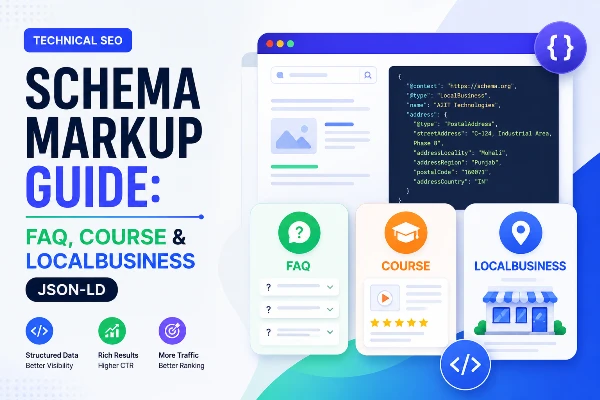
- Schema markup generation: Ask AI to write structured data (schema) code for your blog posts, courses, or business listing.
- Error diagnosis: Copy a Search Console error message and ask AI to explain it in simple language and suggest a fix.
Section Summary
- Technical SEO = making sure Google can crawl, read, and understand your website.
- It is different from on-page SEO (content) and off-page SEO (backlinks).
- Run a technical audit when rankings drop, after a redesign, or every 3–6 months.
- Key tools: Google Search Console (free), Screaming Frog (free/paid), AI tools.
- You do not need coding skills to get started — just the right tools and process.
Crawling: How Google Finds Your Website
Now that you understand the foundation of Technical SEO, the next step is learning how Google actually discovers your website pages. In the next blog, we will cover:
- What is website crawling and how Googlebot works
- robots.txt explained step-by-step
- XML sitemap optimization — 50,000 URL & 50MB limits
- Crawl budget issues and how to fix them
- How to detect spam bots and AI crawlers
- Redirect chains — 301 vs 302 explained