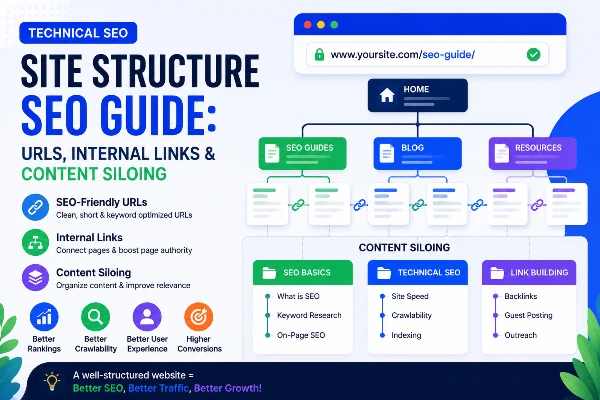
Site Structure SEO Guide: URLs, Internal Links & Content Siloing
Site Structure — Building an SEO-Friendly Architecture
You have reached the final part of the Technical SEO Audit Masterclass. Over the previous six parts you learned how Google finds your pages (crawling), reads them (rendering), stores them (indexing), measures their speed (Core Web Vitals), and understands their content (schema).
In this final part, we bring everything together with site structure — the foundation that ties all other technical SEO work together. A well-structured website is like a well-designed building. Every room is easy to find, every floor makes logical sense, and the most important rooms are closest to the entrance.
Without good site structure, even perfect content and fast loading speeds are not enough. Google may fail to understand which pages are important, which topic your website is an expert on, or how all your pages relate to each other.
1. URL Structure Best Practices for Large Websites
Your URL is the address of every page on your website. A well-structured URL tells both users and Google exactly what a page is about before they even visit it. Think of URLs like the postal address of your content — a clear address means faster and more accurate delivery.
What makes a good URL for SEO?
URL structure rules — every rule explained
| Rule | Correct | Wrong | Why it matters |
|---|---|---|---|
| Use hyphens — not underscores | /web-development | /web_development | Google reads hyphens as word separators. Underscores join words — Google reads web_development as one word. |
| Always lowercase | /digital-marketing | /Digital-Marketing | Uppercase letters can create duplicate URLs — /Courses and /courses are treated as different pages on many servers. |
| Keep URLs short | /blog/seo-guide | /blog/complete-ultimate-definitive-seo-guide-2026 | Short URLs are easier to share, remember, and read. Google truncates long URLs in search results. |
| Include focus keyword | /cybersecurity-internship | /course-page-7 | Keyword in URL is a minor ranking signal and tells users what the page is about before clicking. |
| Reflect site hierarchy | /blog/seo/technical-seo-guide | /content/item/xyz/abc | Hierarchical URLs help Google understand the relationship between pages and their depth in the site. |
| No dates in URLs | /blog/technical-seo-guide | /blog/2024/05/technical-seo-guide | Dates make content look outdated. A 2024 URL in 2026 may get fewer clicks even if content is updated. |
| No special characters | /hr-internship | /hr-&-management-internship! | Special characters like &, !, #, % can cause encoding issues and are blocked by some robots.txt rules. |
| Avoid unnecessary parameters | /courses | /courses?view=grid&sort=name&page=1 | Parameters create duplicate content and waste crawl budget — handle them via canonical tags or robots.txt. |
URL hierarchy — how to structure pages for A2IT InternEdge
Your URL structure should reflect how your content is organised. Here is the ideal hierarchy for an IT training website:
How to change URLs safely — without losing rankings
If your existing URLs are poorly structured, you can improve them — but you must do it carefully to avoid losing your current rankings.
- Create the new URL — set up the new clean URL for the page.
- Set up a 301 permanent redirect from the old URL to the new URL — this transfers all existing ranking signals.
- Update your sitemap — replace the old URL with the new URL in your XML sitemap.
- Update internal links — find all pages linking to the old URL and update them to point to the new URL directly.
- Use URL Inspection in GSC — request indexing of the new URL and monitor for any errors.
- Wait 28 days — check Google Search Console to confirm the new URL is indexed and rankings have transferred.
2. Internal Linking Strategy — How to Distribute Link Equity
Internal linking is one of the most powerful and most underused SEO techniques. Every link you place from one page to another on your own website does two things — it helps Google discover the linked page, and it passes ranking authority (link equity) to that page.
What is link equity and how does it flow?
Think of link equity like water flowing through a pipe system. Your homepage is the main water tank — it receives the most external backlinks and therefore holds the most authority. Every internal link from the homepage flows authority to the linked page. Those pages then flow authority to pages they link to, and so on.
The golden rules of internal linking
| Rule | What to do | What NOT to do |
|---|---|---|
| Use descriptive anchor text | Link text: "Digital Marketing Internship Course in Mohali" | Link text: "click here" or "read more" |
| Link from high-authority pages | Add links to important pages from your homepage and top-traffic pages | Only linking from new, unranked pages |
| Link to orphan pages | Find pages with zero internal links and add at least 3 links pointing to them | Leaving important pages with no internal links |
| Link contextually in content | Add links naturally within article text where relevant | Stuffing a list of links in the footer only |
| Avoid too many links per page | Keep internal links to 50–100 per page maximum | Pages with 300+ links — Google splits equity too thin |
| Use dofollow links | Default links pass equity — leave them as dofollow | Adding nofollow to internal links — wastes equity |
| Keep links relevant | Link to related content within the same topic area | Linking a cybersecurity page to a finance page with no context |
How to audit and fix internal links — step by step
Crawl your website → go to Reports → Orphan Pages. These are pages in your sitemap that have zero internal links pointing to them. Every important page should have at least 3–5 internal links.
In Screaming Frog, click any URL → go to the Inlinks tab at the bottom. This shows every page linking to that URL. If your most important course pages have fewer than 5 inlinks — add more from related blog posts and category pages.
In Screaming Frog → Bulk Export → All Inlinks. Check the anchor text column. All internal links to your Digital Marketing Internship page should use keyword-rich anchor text — not just "click here."
Go through your existing blog posts and add internal links where relevant. Every blog post about SEO topics should link to your Digital Marketing Internship course page. Every blog about web development should link to your Web Development course.
If you have 10 blog posts about digital marketing, create a Digital Marketing Hub page that links to all 10. Then link to the hub from your homepage. This way all 10 posts receive equity from the homepage through the hub.
Internal linking — practical HTML code
<!-- BAD internal link — no anchor text context --><p>Learn more about our courses <a href="/courses">click here</a></p><!-- GOOD internal link — keyword-rich descriptive anchor text --><p>Enroll in our <a href="/digital-marketing-internship-course"> Digital Marketing Internship Course in Mohali </a> to learn SEO, Google Ads, and social media marketing with live projects.
</p><!-- Linking to a related blog post within article content --><p>For more details on crawling, read our guide on <a href="/blog/technical-seo-crawling-guide-beginners"> how to audit your robots.txt and XML sitemap </a>.
</p><!-- NEVER use nofollow on internal links --><a href="/courses" rel="nofollow">Courses</a> <!-- wastes link equity --><!-- All internal links should be dofollow by default --><a href="/courses">IT Training Courses — A2IT InternEdge</a>
3. Breadcrumbs and Their Role in Site Structure SEO
Breadcrumbs are a secondary navigation trail at the top of a page that shows users exactly where they are in the website hierarchy. They look like this:
This simple navigation trail does four powerful things for your SEO that most beginners overlook completely.
What breadcrumbs do for SEO
| Benefit | How it helps SEO | Real example |
|---|---|---|
| Creates automatic internal links | Every breadcrumb link is an internal link back to a parent page — passing equity upward through the hierarchy | Every blog post breadcrumb links back to /blog — giving the blog hub page consistent equity |
| Appears in Google search results | Google shows breadcrumbs instead of the raw URL below your page title — making results look cleaner and more trustworthy | Search result shows: a2itsoft.com › Blog › Technical SEO instead of the full URL |
| Helps Google understand site hierarchy | Breadcrumbs confirm the parent-child relationship between pages — reinforcing your site structure signals | Google sees Blog as parent of Technical SEO posts — strengthening the blog category's topical relevance |
| Reduces bounce rate | Users who land on a deep page can easily navigate back to the parent category — discovering more content instead of leaving | A user reading a cybersecurity blog clicks the breadcrumb to see all cybersecurity content |
How to add breadcrumbs — HTML + Schema combined
<!-- Step 1: Add visible breadcrumb HTML to your page --><nav aria-label="breadcrumb"> <ol class="breadcrumb"> <li><a href="https://www.a2itsoft.com">Home</a></li> <li><a href="https://www.a2itsoft.com/blog">Blog</a></li> <li><a href="https://www.a2itsoft.com/blog/technical-seo-audit-masterclass-a-step-by-step-guide-for-beginners">Technical SEO Masterclass</a></li> <li aria-current="page">Site Structure Guide — Part 7</li> </ol>
</nav><!-- Step 2: Add BreadcrumbList schema in <head> for Google rich results --><script type="application/ld+json">
{ "@context": "https://schema.org", "@type": "BreadcrumbList", "itemListElement": [ { "@type": "ListItem", "position": 1, "name": "Home", "item": "https://www.a2itsoft.com" }, { "@type": "ListItem", "position": 2, "name": "Blog", "item": "https://www.a2itsoft.com/blog" }, { "@type": "ListItem", "position": 3, "name": "Technical SEO Masterclass", "item": "https://www.a2itsoft.com/blog/technical-seo-audit-masterclass-a-step-by-step-guide-for-beginners" }, { "@type": "ListItem", "position": 4, "name": "Site Structure Guide — Part 7", "item": "https://www.a2itsoft.com/blog/site-structure-seo-guide-beginners" } ]
}
</script>
Breadcrumb CSS — basic styling
/* Basic breadcrumb styling — clean and readable */.breadcrumb { list-style: none; padding: 0; margin: 0 0 20px; display: flex; flex-wrap: wrap; gap: 4px; font-size: 13px; color: #6b7280;
}
.breadcrumb li::after { content: ' › '; margin-left: 4px; color: #9ca3af;
}
.breadcrumb li:last-child::after { content: ''; /* No separator after last item */}
.breadcrumb a { color: #0d3b8c; text-decoration: none;
}
.breadcrumb a:hover { text-decoration: underline;
}
4. Siloing Content for Topical Authority
Content siloing is the most powerful — and least understood — advanced site structure technique in SEO. It is what separates websites that rank for one or two keywords from websites that dominate an entire topic area across hundreds of keywords.
What is topical authority?
Topical authority is when Google recognises your website as a trusted expert on a specific subject. When you have topical authority in digital marketing SEO, Google ranks your content higher for all digital marketing searches — not just the specific keywords you targeted.
Think of it this way: a website about only one topic ranks better for that topic than a website about many topics. A website with 30 well-organised, interlinked articles about cybersecurity will outrank a website with 100 scattered articles across many unrelated topics — for every cybersecurity search.
How content siloing works — with a visual
The rules of content siloing
- Link freely within a silo — all cybersecurity blog posts link to each other and to the cybersecurity course hub page.
- Link sparingly between silos — only link from one silo to another when there is a genuinely relevant reason. A digital marketing post linking to a cybersecurity post should only happen if the topic genuinely overlaps.
- Every silo has a hub page — the hub page is the most important page in the silo. All content in the silo links to the hub. The hub links back to related content. The hub links to the homepage.
- The homepage links to every silo hub — this ensures every silo receives homepage link equity.
- Cover topics comprehensively — Google rewards depth. A silo with 15 interlinked articles covering every aspect of a topic outranks a silo with 2 surface-level articles.
How to build a silo — practical step-by-step
For A2IT InternEdge: Digital Marketing, Cybersecurity, Web Development, AI/ML, Data Analytics, Finance. Each becomes one silo. Never mix topics — cybersecurity content belongs only in the cybersecurity silo.
The hub is the main page for that topic. For digital marketing, the hub is the Digital Marketing Internship Course page. All blog posts about SEO, Google Ads, and social media link to this hub.
For each silo, create at least 5–10 supporting blog posts or pages covering subtopics. For the digital marketing silo: "What is SEO", "Google Ads guide", "Social Media Marketing tips", "Technical SEO audit guide", etc.
Every article in the digital marketing silo must link to the Digital Marketing Internship Course page with keyword-rich anchor text. This concentrates all the silo's authority in the hub page.
Blog posts within the same silo should link to each other where relevant. The Technical SEO guide links to the Google Analytics guide. The Google Ads guide links to the Digital Marketing fundamentals post. This weaves the silo into a tight topical network.
Every hub page should link back to the homepage. This creates a two-way flow of equity — homepage sends equity to hubs via navigation, hubs send equity signals back to homepage via their own authority.
Complete 50-Point Technical SEO Audit Checklist
This is your master checklist covering all 7 parts of this series. Use it every time you audit a website.
🕷 Crawling
🖥 Rendering
📋 Indexing
⚡ Core Web Vitals
🏷 Schema Markup
🗺 Site Structure
Site Structure Checklist — Section Summary
- URLs — lowercase, hyphens, keyword included, short, no dates, no parameters
- Reflect hierarchy in URLs — /blog/seo/technical-seo-guide shows Google the structure
- 3-click rule — every important page reachable in 3 clicks from homepage
- Internal links — use descriptive anchor text, link to orphan pages, link from high-authority pages
- Never use nofollow on internal links — it wastes your own link equity
- Breadcrumbs — add visible HTML breadcrumbs AND BreadcrumbList schema on every page
- Content silos — group related content together, link freely within silos, sparingly between
- Hub pages — every silo needs a hub page that all silo content links to
- Topical authority — 15 interlinked articles on one topic outrank 100 scattered articles
- Homepage links to all silo hubs — ensuring equity flows throughout your entire site
🎉 Congratulations — Technical SEO Audit Masterclass Complete!
You have completed all 7 parts of the Technical SEO Audit Masterclass. You now have the knowledge to audit and fix any website's technical SEO from the ground up.
Ready to apply these skills in the real world? Join A2IT InternEdge's Digital Marketing & SEO Internship and work on live client websites in Mohali.
📲 Apply for the SEO Internship →